
Skills
The skills an employee has installed, the catalog, moving a skill between employees, and skills an employee writes itself.
Where
Configure ‹employee› → Skills.
The screen opens on what this employee has installed, not on the catalog. Each skill is a row you can expand, with a search field above and three buttons at the top: Resync, Import and Catalog.

What each row can do
| Button | What it does |
|---|---|
| ▷ | Brief & prepare: asks the employee to read the skill's documentation, install what it needs, and explain back what it does |
| ⤓ | Export skill, downloads the skill as a file |
| ↺ | Reinstall skill, puts the reference version back |
| 🗑 | Delete skill, removes it from this employee |
Brief & prepare is worth knowing about. A freshly added skill is a folder of files the employee has not read yet. This button makes it read them, install its dependencies, and tell you what it can now do, which is also the fastest way to check that a skill really works before relying on it.
Adding a skill
Three ways, depending on where the skill comes from.
Available Skills
At the bottom of the list, Available Skills (n) shows what is ready to be installed on this employee, with a short description each. + Add installs it, on the spot, with nothing else to fill in.
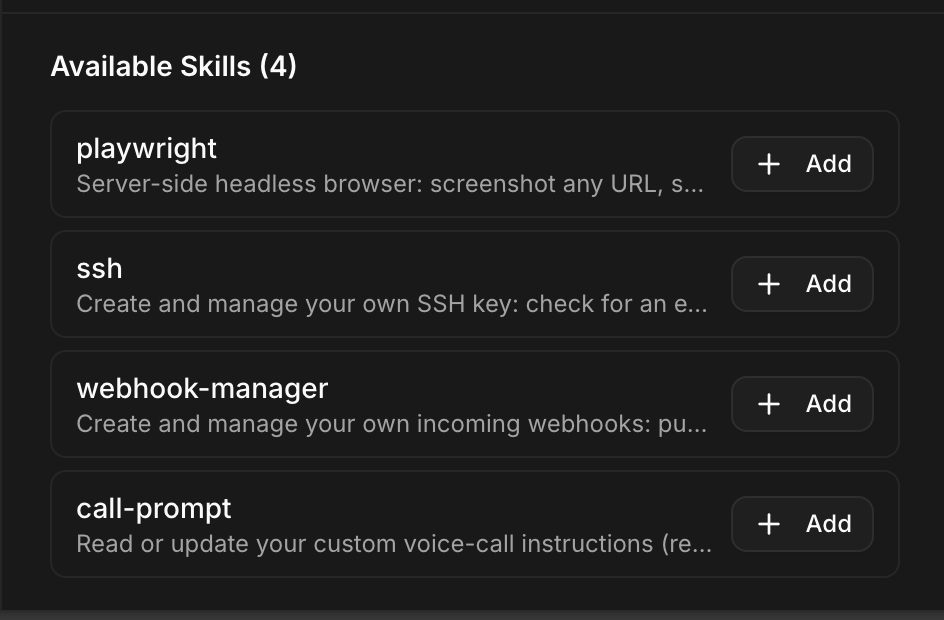
Catalog
Catalog opens the Skills Marketplace, the full library, thousands of skills, well beyond what the Available Skills shortlist offers.

A search field at the top (e.g. frontend, testing, react), then a grid of skills, each with its publisher and how many times it has been installed.
The download count is the useful signal. With a library this size, the question is not does a skill exist for this?, it usually does, but which one is actually used? Sort your reading by that number rather than by name.
Import
Import loads a skill from a file, the counterpart of Export below.
Moving a skill from one employee to another
There is no "copy to" action, and none is needed: export on one side, import on the other.
- On the employee that has the skill, open Skills and click Export skill (⤓) on its row.
- On the employee that should get it, open Skills and click Import.
- Load the exported file.
That is the whole procedure. It works for a catalog skill as well as for one written in-house, and it is the way to spread a skill you wrote once across a team without rewriting it.
Skills an employee writes itself
An employee can write its own skill. Ask it for a capability it does not have, and it can build the skill rather than improvise the same work every time.
Those show up in the list with a Custom badge.
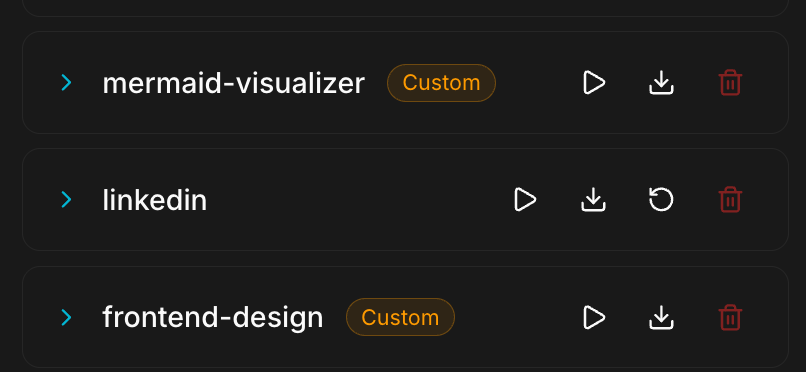
A Custom skill has no Reinstall button, the other rows have four actions, a custom one has three. That is the tell, and it makes sense: there is no reference version to put back. Nobody but you has a copy.
So export it. A custom skill lives in that employee's container and nowhere else. Export it to keep a copy, and to give it to another employee.
Tools is a different screen
Configure ‹employee› → Advanced → Tools does not decide what the employee can do, it decides what the chat shows of its work. See Tools.
The default
A new employee can hold a conversation and little else. Everything it does comes from this screen.
Grant only what the job needs. A skill an employee never uses is one more way for it to go sideways.
What breaks
A skill that needs a key of its own will not work until the key exists in Secrets. Image generation is the usual case: an employee without its own key falls back on the platform key only if the workspace allows it, in Admin Settings.
A custom skill is lost with the employee. Deleting the employee, or its container, takes any skill it wrote and that was never exported.