
Appearance
The portrait, the physical description that generates it, and the reference images.
Where
Configure ‹employee› → Advanced → Appearance.
What it does
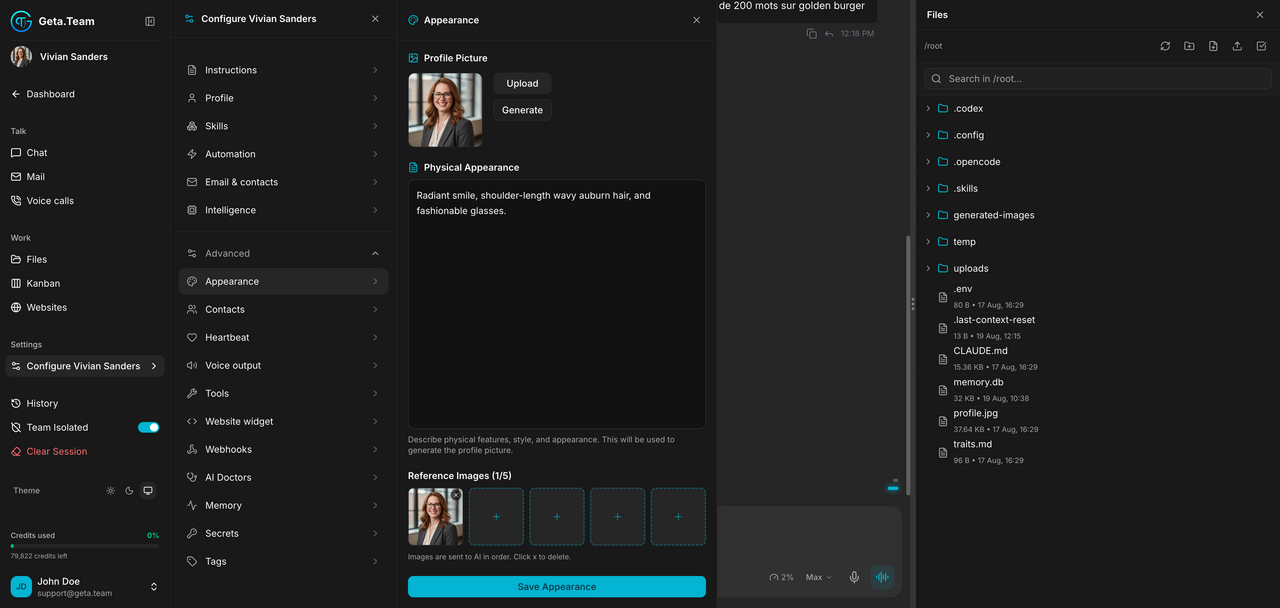
- Profile Picture: upload your own, or Generate one.
- Physical Appearance: a free description of features, style and looks. This text is the prompt used to generate the portrait, so a vague description gives a vague portrait.
- Reference Images, up to five, to guide the generation. The screen states it: images are sent to AI in order. The first one weighs most.
Then Save Appearance.
The default
The portrait generated at hiring, from what you typed in step 3 of the wizard.
What breaks
Regenerating replaces the portrait everywhere the employee appears, including the avatar your team recognises in Slack or Teams. If the face matters to people outside, upload a file you keep rather than regenerating on a whim.