
Containers
One container per employee, with CPU, memory and uptime.
Where
Settings → Containers.
What it does
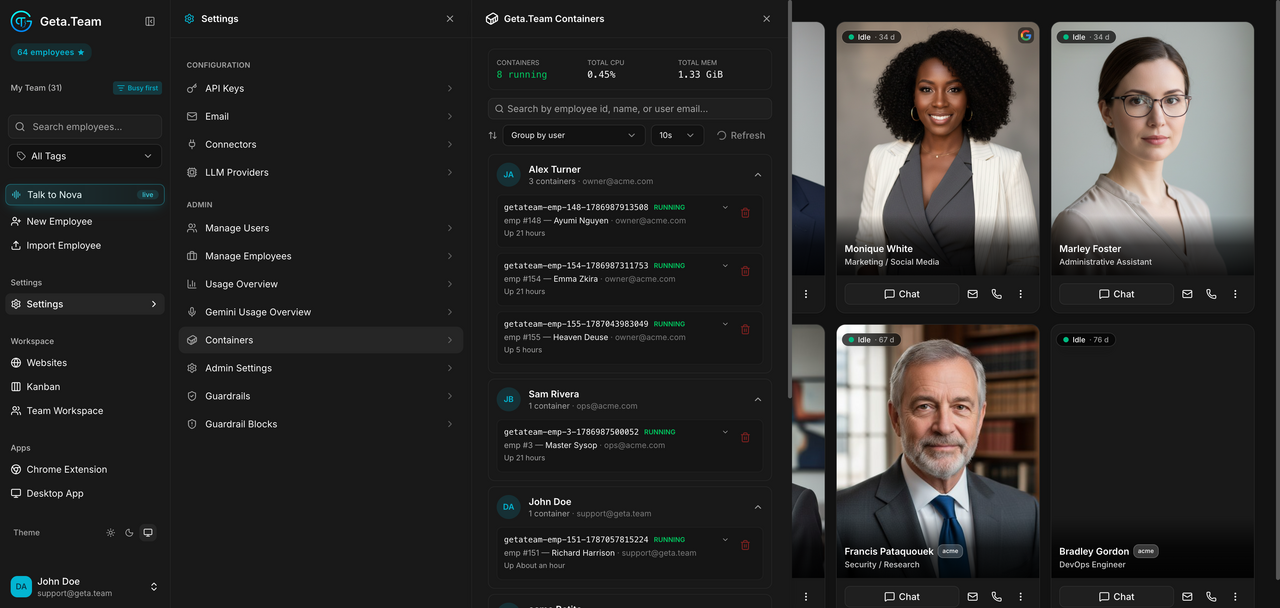
Each employee runs in its own container. This screen lists them with a summary at the top: how many are running, total CPU, total memory.
Each row gives the container name, its state (RUNNING), which employee it
belongs to, and how long it has been up. Group by user regroups the list
by owner, and the view refreshes on a 10s interval.
The default
A container is started when its employee is used and stays up afterwards, which is why uptimes of many hours are normal on an idle workspace.
What to watch
Total memory and total CPU are the honest measure of what your instance is
doing. An employee whose container has been up for days while its card shows
Idle · 3 d is holding memory for nothing, use Clear Session on that
employee.