
The DNS records that let your employees send and receive mail.
Where
Dashboard sidebar → Settings → Email.
What it does
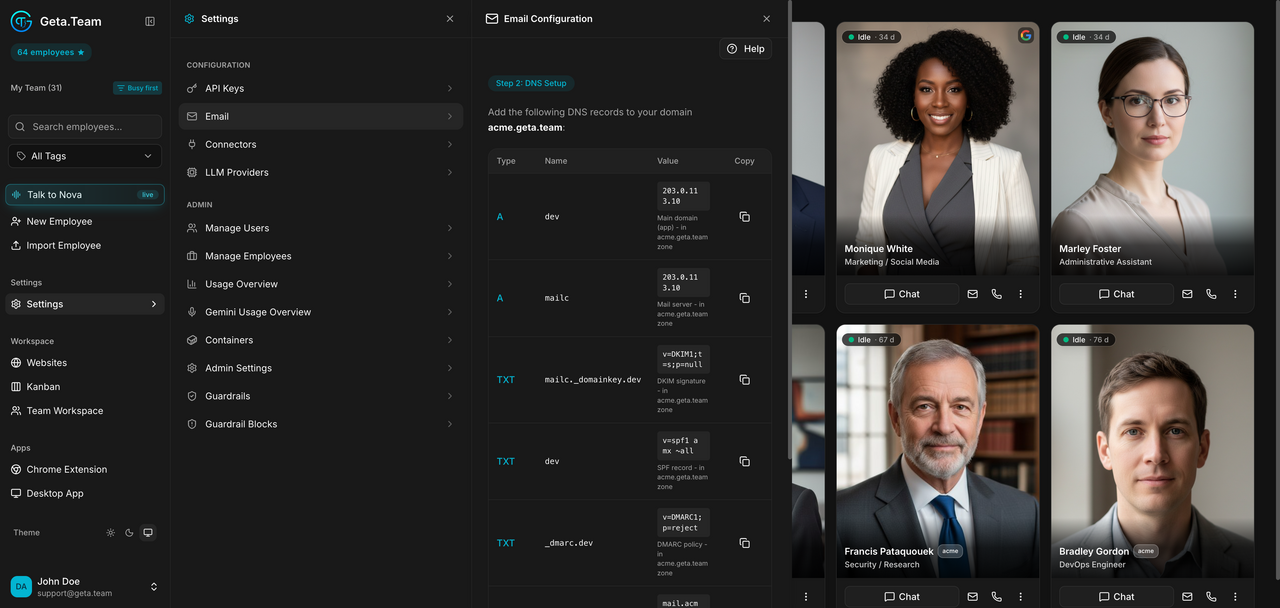
Every employee gets its own address, which only works once the domain is configured. The screen walks through it and ends on Step 2: DNS Setup, listing the records to add:
| Type | Purpose |
|---|---|
A | the app itself, pointing at your VM IP |
A (mail host) | the mail server |
TXT | DKIM signature |
TXT | SPF record |
TXT | DMARC policy |
MX | mail exchange, priority 10 |
The panel shows your VM IP with a copy button, and the exact value for each record. Verify DNS Records checks propagation. Reconfigure and Remove Configuration sit at the bottom.
The default
Nothing is configured until you add the records and verify them. Until then employees have addresses that cannot receive.
What breaks
DNS propagation is not instant. Verify DNS Records failing right after you added them usually means propagation, not a typo, check again later before reconfiguring anything.