
Nova
The orchestrator that dispatches work across your team, keeps its own memory, and can hire.
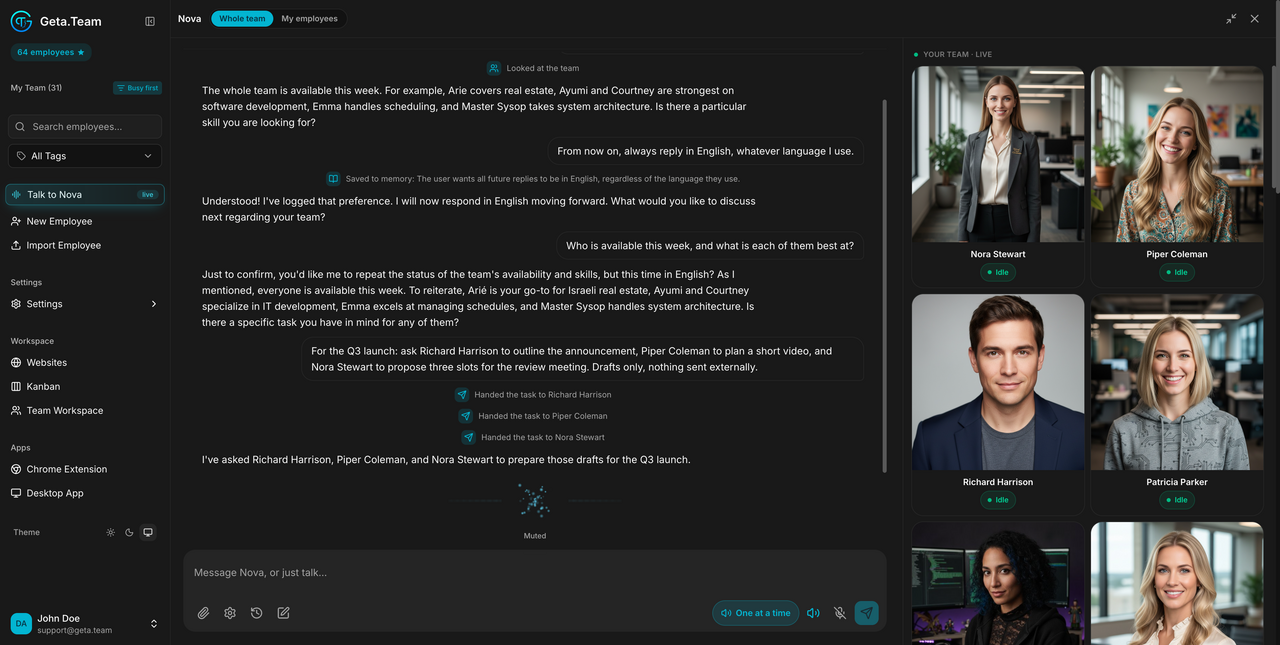
Nova sits at the top of the dashboard sidebar with a live badge. It is not an employee: it is how you talk to the team as a whole. You give Nova an intention, it works out who should do the work and hands it over.
Where
Dashboard sidebar → Talk to Nova.
The panel
Nova opens full-screen, with two scopes selected at the top:
- Whole team, Nova can reach every employee in the workspace.
- My employees, limited to the ones belonging to your account.
You type in Message Nova, or just talk..., or you speak. The right-hand column, YOUR TEAM · LIVE, lists your employees and their status while you talk. When a teammate answers, the reply comes back into the conversation marked with their name.
What Nova can do
Run the team
List the team with everyone's id, role, skills and live kanban load, which is how Nova knows who is free before handing out work.
Delegate a task to a named teammate: a concrete action they carry out, phrased as a complete, self-contained instruction. Nova can also forward to a teammate what it has just looked up, rather than summarising it back to you.
Drive their kanban boards
Nova reads and writes the boards directly, on your behalf:
| Action | What it does |
|---|---|
| List | reads a teammate's board, cards grouped by column |
| Create | adds a card, and the teammate is notified |
| Move | moves a card to todo, in_progress, done or need_attention |
| Update | edits a card's title or notes |
Hire and restyle
Nova can staff the team itself, in two steps that are deliberately separate:
- Propose drafts a full persona, first and last name, age, origin, city, job title, communication style, physical traits. It creates nothing, it is a draft for you to approve.
- Create turns an approved draft into a real employee.
- Restyle changes an existing employee's persona.
The physical traits field is worth care: the same text is both the avatar photo prompt and the teammate's traits file, so a vague description gives a vague portrait and a vague personality at once.
Remember
Nova keeps its own long-term memory, separate from each employee's: durable facts, preferences and decisions about you and your team. It can store, search by keyword, list what is recent, correct an entry by id, and delete one that has become wrong.
This is what lets Nova pick the right person months later without being told again who does what.
Look things up
- GetaTeam documentation, a built-in knowledge base of 23 topic sheets covering connectors, skills, MCP, editions and pricing, telephony, automation, users, websites and the rest. Ask Nova how something works and it reads these rather than guessing.
- Web search, for anything outside the product.
- Weather.
- Current date and time in your timezone, which it uses for any question about dates rather than assuming.
The default
Nova listens as soon as you open it. The panel shows Listening... with a
live waveform, and your microphone stays active until you close the panel with
the ×. A One at a time toggle in the composer controls whether replies
are read out one after another.
What breaks
Closing the browser tab without closing the panel leaves the microphone session open. Close the panel, don't just navigate away.
Nova acts, it does not only answer. Delegating, creating a card or creating an employee are real actions with real effects on your team, a card created by Nova notifies its owner immediately. Phrase requests as what you want done, and expect it to be done.